

Maya wants to convert $1,000 in her Roam wallet to GBP. Before she confirms the exchange, Roam shows that she will receive £770. Once the exchange is complete, the amount appears in her GBP balance.
For Maya, the process is straightforward. Behind the scenes, the ledger records the USD leaving her wallet and the GBP entering it as separate currency movements.
If Roam earns from the exchange rate, that amount must be recorded too. All the movements must remain connected so Maya is never debited without receiving the corresponding GBP.
In this guide, we’ll build this USD-to-GBP conversion flow using Blnk. We’ll create separate currency balances, record both sides of the exchange, and submit every movement as one atomic bulk transaction.
Mental model
For products that hold value in multiple currencies, supporting an exchange is not just about calculating a rate.
This includes wallets, remittance apps, neobanks, travel cards, treasury products, and other applications that move value between currencies. In every case, the ledger must keep both sides of the conversion in sync and leave a clear audit trail.
Because every Blnk transaction records one currency, Roam cannot record the conversion as a direct transfer from Maya’s USD balance to her GBP balance. It needs a separate transaction leg for each currency.
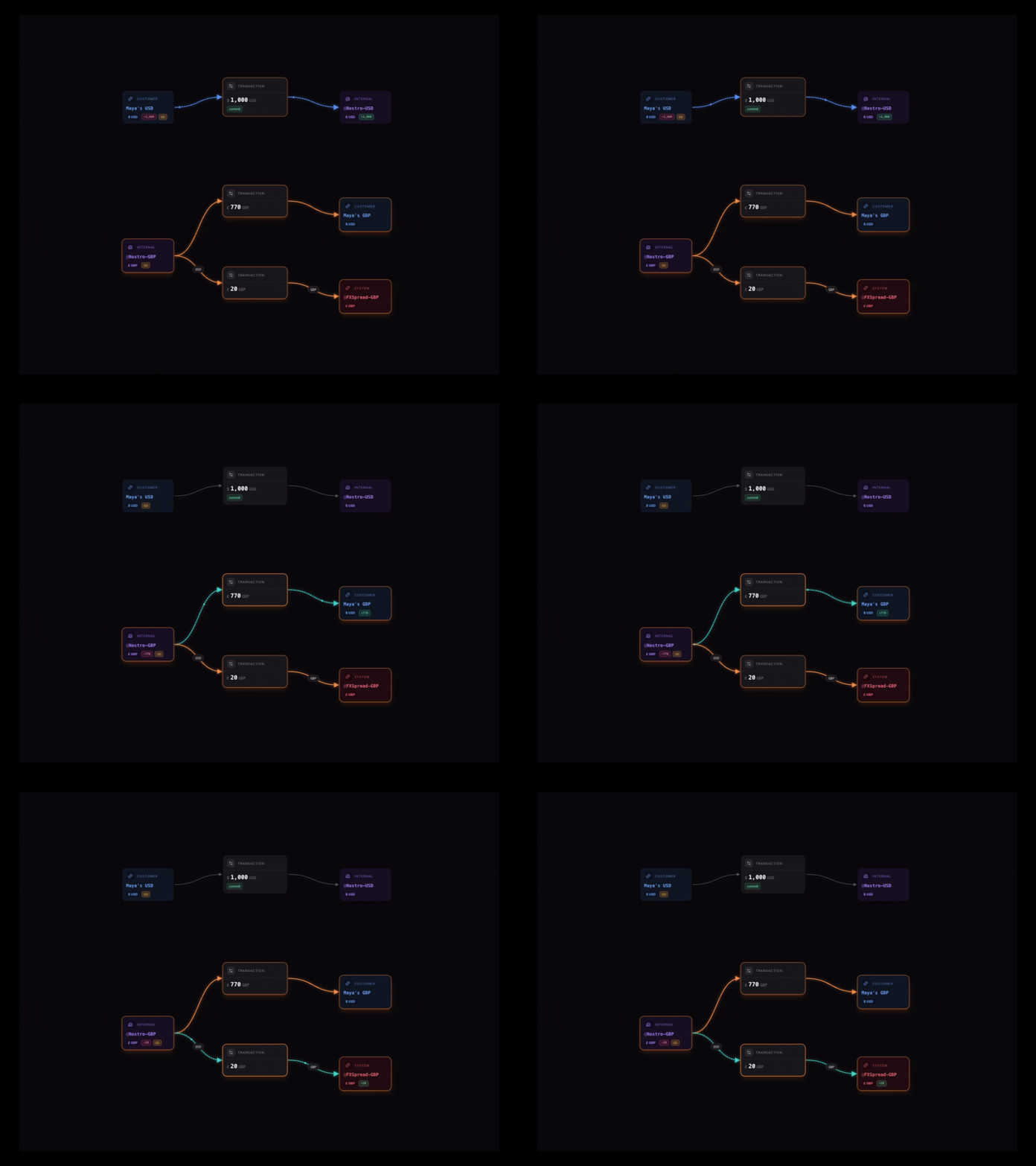
To do this, Roam uses nostro balances: internal balances that represent its side of the exchange in each currency. @Nostro-USD receives the USD from Maya, while @Nostro-GBP provides the GBP she receives.
The exchange also includes an FX spread, which is the difference between the market rate and the rate offered to Maya. At the market rate, $1,000 is worth £790. Maya receives £770, leaving a £20 spread for Roam.
With this structure, the conversion is recorded as three movements:
- Move
$1,000 USDfrom Maya’s USD balance to@Nostro-USD. - Move
£770 GBPfrom@Nostro-GBPto Maya’s GBP balance. - Move the remaining
£20 GBPfrom@Nostro-GBPto@FXSpread-GBP.
Blnk submits the three movements as one atomic bulk request. This prevents Maya from being debited without receiving GBP and saves Roam from manually reconciling or reversing a partial conversion.
Step 1: Set up the multi-currency wallet
Before recording the conversion, Maya needs separate balances for USD and GBP.
To implement this structure with Blnk:
- Create a Customer Wallets Ledger to group customer balances.
- Create an identity for Maya.
- Create separate USD and GBP balances under the Customer Wallets Ledger and link both to Maya’s identity.
- Keep the returned balance IDs. You’ll use them as the source and destination of the conversion.
Linking both balances to one identity lets Roam present them as one customer account while Blnk maintains a separate balance and transaction history for each currency.
The conversion also uses three internal balances:
@Nostro-USDreceives the USD collected from customers.@Nostro-GBPprovides the GBP delivered to customers.@FXSpread-GBPrecords spread earned in GBP.
Internal balances are created in the General Ledger the first time you reference them.
In practice, each nostro balance should represent where that currency comes from, such as funds held by Roam or funds made available by a bank or FX provider.

Step 2: Fund Maya’s USD wallet
Before Maya can exchange USD for GBP, her USD balance needs enough funds. Record the funding transaction after her bank, card processor, or payment provider confirms the deposit.
For this example, record $1,000 entering Maya’s USD balance from @World-USD, an internal balance that represents money entering the ledger from outside Roam:
curl -X POST "http://YOUR_BLNK_URL/transactions" \
  -H "Content-Type: application/json" \
  -H "X-Blnk-Key: YOUR_API_KEY" \
  -d '{
    "amount": "1000.00",
    "precision": 100,
    "currency": "USD",
    "reference": "wallet_funding_maya_1001",
    "source": "@World-USD",
    "destination": "bln_maya_usd",
    "description": "Fund Maya USD wallet",
    "allow_overdraft": true,
    "meta_data": {
      "customer_id": "maya_001",
      "provider_reference": "pay_1001"
    }
  }'
Response:
{
  "transaction_id": "txn_wallet_funding_maya_1001",
  "reference": "wallet_funding_maya_1001",
  "status": "QUEUED",
  "source": "@World-USD",
  "destination": "bln_maya_usd",
  "amount": 1000,
  "precise_amount": 100000,
  "precision": 100,
  "currency": "USD",
  "description": "Fund Maya USD wallet"
}
Here’s what happens:
allow_overdraft: trueallows@World-USDto go negative because it represents money entering Roam from outside the ledger, not a prefunded balance.referenceuniquely identifies the transaction. If the same funding request is sent again, Blnk uses it to prevent a duplicate transaction.precision: 100tells Blnk that one USD contains 100 cents. This means$1,000.00is represented internally as100000.meta_dataconnects the ledger entry to Maya and the payment provider’s original deposit reference.
Once the transaction is applied, Maya has $1,000 available in her USD balance and can continue with the conversion.
Step 3: Calculate the exchange quote
Before creating the transactions, Roam gets the market rate from its FX provider and calculates what Maya should receive.
For this conversion:
| Quote field | Value |
|---|---|
| Source amount | $1,000 USD |
| Market rate | $1 = £0.79 |
| Customer rate | $1 = £0.77 |
| Market equivalent | £790 GBP |
| Customer receives | £770 GBP |
| Spread | £20 GBP |
Exchange rates can change, so the rate shown to Maya should only remain valid for a limited time. Before submitting the conversion, confirm that the rate has not expired and that Maya still has the required USD available.
Step 4: Record the conversion atomically
Submit all three movements to Blnk’s Bulk Transactions endpoint:
curl -X POST "http://YOUR_BLNK_URL/transactions/bulk" \
  -H "Content-Type: application/json" \
  -H "X-Blnk-Key: YOUR_API_KEY" \
  -d '{
    "atomic": true,
    "inflight": false,
    "run_async": false,
    "transactions": [
      {
        "amount": "1000.00",
        "precision": 100,
        "currency": "USD",
        "reference": "fx_1001_usd_debit",
        "source": "bln_maya_usd",
        "destination": "@Nostro-USD",
        "description": "USD leg of Maya USD to GBP conversion",
        "allow_overdraft": false,
        "meta_data": {
          "conversion_id": "fx_1001",
          "market_rate": "0.79",
          "customer_rate": "0.77"
        }
      },
      {
        "amount": "770.00",
        "precision": 100,
        "currency": "GBP",
        "reference": "fx_1001_gbp_credit",
        "source": "@Nostro-GBP",
        "destination": "bln_maya_gbp",
        "description": "GBP leg of Maya USD to GBP conversion",
        "allow_overdraft": true,
        "meta_data": {
          "conversion_id": "fx_1001",
          "market_rate": "0.79",
          "customer_rate": "0.77"
        }
      },
      {
        "amount": "20.00",
        "precision": 100,
        "currency": "GBP",
        "reference": "fx_1001_gbp_spread",
        "source": "@Nostro-GBP",
        "destination": "@FXSpread-GBP",
        "description": "Spread earned on Maya USD to GBP conversion",
        "allow_overdraft": true,
        "meta_data": {
          "conversion_id": "fx_1001",
          "market_rate": "0.79",
          "customer_rate": "0.77"
        }
      }
    ]
  }'
A successful response returns a batch_id that links the transactions created from the request:
{
  "batch_id": "bulk_fx_1001",
  "status": "applied",
  "transaction_count": 3
}
Here’s what happens:
atomic: truetells Blnk to apply all three movements together. If one fails, none of them are recorded.
Each transaction keeps one currency from source to destination. There is no direct USD-to-GBP ledger entry.
- The shared
conversion_idconnects all three entries to the same conversion, whilemarket_rateandcustomer_ratepreserve the rates used.
Recording the spread separately gives finance a clear view of Roam’s FX revenue without deriving it from customer balances.
- Each leg has a unique
reference, preventing duplicate transactions if the request is retried.
allow_overdraft: true lets @Nostro-GBP provide GBP even when its ledger balance is insufficient.
Use false when the balance represents prefunded GBP and conversions should stop when those funds run out.
If a bank or FX provider supplies the GBP, enforce the provider’s limits before submitting the conversion.
Step 5: Review the conversion in Blnk Cloud
After recording the batch, review the three movements in Blnk Cloud to confirm that their amounts, currencies, and destinations are correct.
Open the Transactions page and add a filter where metadata.conversion_id contains fx_1001. The result should show three applied movements:
$1,000 USDfrom Maya’s USD balance to@Nostro-USD.£770 GBPfrom@Nostro-GBPto Maya’s GBP balance.£20 GBPfrom@Nostro-GBPto@FXSpread-GBP.
Open any result to inspect its amount, currency, source, destination, and metadata. The details should include conversion_id, market_rate, customer_rate, and the parent transaction that connects it to the batch.
Keeping all three movements under one conversion_id gives support and finance a complete audit trail. This makes conversion investigations faster and reduces the need to compare disconnected records manually.
What else can you build?
This guide focuses on USD to GBP, but the same structure works for other fiat and digital-asset conversions. Once the core flow is in place, you can extend Roam with:
- Fixed conversion fees: Record a separate fee alongside the exchange-rate spread.
- Customer-specific rates: Store a customer’s pricing tier or account type in metadata, then use that value when your application calculates the customer rate.
- Conversion limits: Enforce daily or per-transaction limits before submitting the batch.
- Nostro reconciliation: Compare each nostro balance with records from the corresponding bank or liquidity provider.
- Exchange statements and reporting: Use the Search API to retrieve and filter conversion transactions for customer statements and reports, then aggregate the results in your application.
Want to test the flow yourself? Launch a Blnk Cloud instance, create USD and GBP balances, and replay the conversion from this guide. Use the Blnk documentation for implementation details, or join the Blnk Discord community if you have questions.