

Sarah just paid $100 for dinner on your delivery app. That money needs to reach Olive Kitchen, James the rider, your platform fee, and the payment processor.
If your ledger records it as one simple transfer, the total adds up. But when someone needs to know how much each merchant earned, what fees were paid, or which ledger entries belong to the original order, a single transaction can't give those answers.
In this guide, we will build a payment splitting flow for a delivery app called DelishPay. We will split one customer payment across the merchant, delivery partner, platform revenue, and processor fees using the Blnk Ledger.
Mental model
First, let's define how money would move when Sarah pays. Her balance is funded from an external source, like her card or bank account, then the payment splits across four destinations: the merchant, the rider, platform revenue, and processor fees.
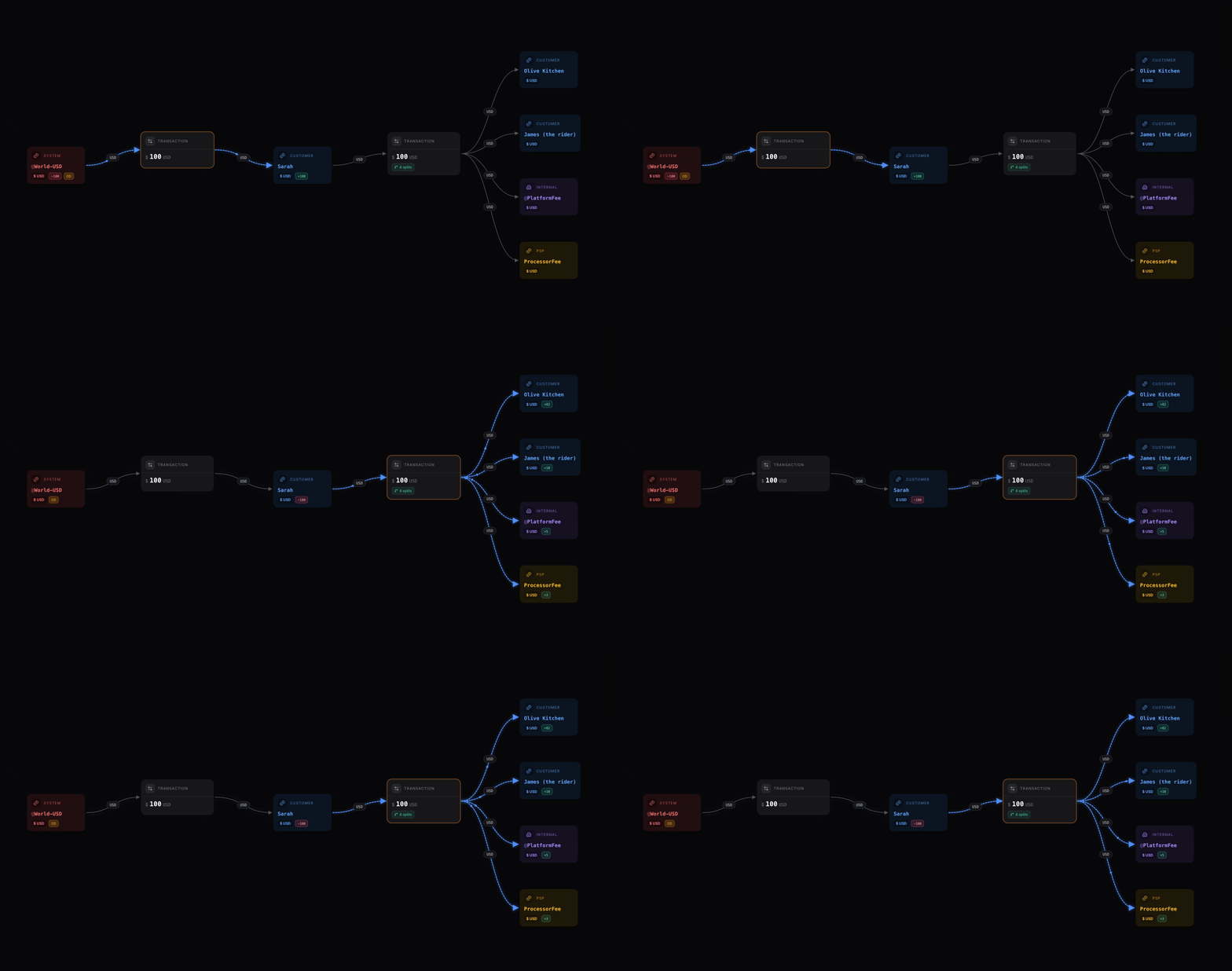
With Sarah's balance funded, when she pays $100, the money moves to four places in the ledger:
- Olive Kitchen gets $82.00 →
bln_merchant_olive_kitchen - James (rider) gets $10.00 →
bln_rider_james_001 - Platform revenue is $5.00 →
@PlatformRevenue - Processor fees are $3.00 →
@ProcessorFees
The customer only sees one payment. But the ledger still needs to know exactly where every part of that $100 went.
That is the difference between the customer view and the ledger view. The customer view stays clean. The ledger view stays detailed.
Step 1 : Set up the ledger structure
To follow along, you'll need a deployed Blnk instance.
For Sarah's order, you need the following ledger and balance structure in place before you can split the payment: each party needs its own balance so the split transaction has somewhere to send money, and so every dollar can be traced back to this order.
Setting up a ledger or a balance always works the same way. If you're doing this for the first time, check out how to create a ledger and how to create a balance.
For this order, you'll need:
- A Customer Ledger, with a balance for Sarah under it.
- A Merchant Ledger, with a balance for Olive Kitchen under it.
- A Rider Ledger, with a balance for James under it.
- Internal balances for platform revenue and processor fees. These start with
@and are created automatically the first time you reference them. Read docs.
Grouping balances by role keeps things organized when you need to query or report later.
The Customer Ledger holds all customer balances, the Merchant Ledger holds all merchant balances, and the Rider Ledger holds all delivery partner balances. Internal balances live in the General Ledger and represent your platform's own accounts, like revenue collection and fee processing.

Step 2: Fund Sarah's balance
Before Sarah can pay for her order, her balance needs money in it. Fund it from an external source (@World-USD), which represents money coming into the ledger from outside your system, such as a card or bank:
const response = await blnk.Transactions.create({
  precise_amount: 10000,
  precision: 100,
  currency: 'USD',
  reference: 'order_1001_wallet_funding',
  source: '@World-USD',
  destination: 'bln_sarah_001',
  description: "Funding Sarah's balance for order 1001",
  allow_overdraft: true,
});transaction, resp, err := client.Transaction.Create(
blnkgo.CreateTransactionRequest{
ParentTransaction: blnkgo.ParentTransaction{
PreciseAmount: big.NewInt(10000),
Precision: 100,
Currency: "USD",
Reference: "order_1001_wallet_funding",
Source: "@World-USD",
Destination: "bln_sarah_001",
Description: "Funding Sarah's balance for order 1001",
},
AllowOverdraft: true,
},
)response = blnk.transactions.create({
"precise_amount": 10000,
"precision": 100,
"currency": "USD",
"reference": "order_1001_wallet_funding",
"source": "@World-USD",
"destination": "bln_sarah_001",
"description": "Funding Sarah's balance for order 1001",
"allow_overdraft": True,
})ApiResponse<JsonNode> response = blnk.transactions().create(
CreateTransactions.create()
.preciseAmount(10000)
.precision(100)
.currency("USD")
.reference("order_1001_wallet_funding")
.source("@World-USD")
.destination("bln_sarah_001")
.description("Funding Sarah's balance for order 1001")
.allowOverdraft(true));{
"transaction_id": "txn_order_1001_funding",
"reference": "order_1001_wallet_funding",
"status": "QUEUED",
"source": "@World-USD",
"destination": "bln_sarah_001",
"precise_amount": 10000,
"currency": "USD",
"description": "Funding Sarah's balance for order 1001",
"created_at": "2026-07-01T10:20:00.000Z"
}Here's what happens:
precise_amount: 10000is the amount in the smallest unit.precision: 100means you divide by 100 to get the display amount. 10000 / 100 = $100.00. Blnk uses integer amounts with a precision field to avoid floating-point errors.referenceis a unique identifier for this transaction. It acts as an idempotency key, so if your app sends the same request twice, Blnk discards the duplicate.allow_overdraft: truelets money flow from@World-USDeven though its balance is zero.@Worldrepresents the outside world, like a card or bank, so it is allowed to go negative.- Once this transaction is applied, Sarah's balance has the $100 needed for the split.
Step 3: Record the split transaction
Then split the $100 across the merchant, rider, platform revenue, and processor fees:
const response = await blnk.Transactions.create({
  precise_amount: 10000,
  precision: 100,
  currency: 'USD',
  reference: 'order_1001_payment_split',
  source: 'bln_sarah_001',
  allow_overdraft: false,
  inflight: true,
  atomic: true,
  description: 'Payment split for order 1001',
  destinations: [
    {
      identifier: 'bln_merchant_olive_kitchen',
      precise_distribution: '8200',
    },
    {
      identifier: 'bln_rider_james_001',
      precise_distribution: '1000',
    },
    {
      identifier: '@PlatformRevenue',
      precise_distribution: '500',
    },
    {
      identifier: '@ProcessorFees',
      precise_distribution: '300',
    },
  ],
  meta_data: {
    order_id: 'order_1001',
    customer_id: 'customer_sarah_001',
    merchant_id: 'merchant_olive_kitchen',
    payment_provider: 'stripe',
    provider_payment_id: 'pi_123456789',
  },
});transaction, resp, err := client.Transaction.Create(
blnkgo.CreateTransactionRequest{
ParentTransaction: blnkgo.ParentTransaction{
PreciseAmount: big.NewInt(10000),
Precision: 100,
Currency: "USD",
Reference: "order_1001_payment_split",
Source: "bln_sarah_001",
Description: "Payment split for order 1001",
Destinations: []blnkgo.Source{
{
Identifier: "bln_merchant_olive_kitchen",
PreciseDistribution: "8200",
},
{
Identifier: "bln_rider_james_001",
PreciseDistribution: "1000",
},
{
Identifier: "@PlatformRevenue",
PreciseDistribution: "500",
},
{
Identifier: "@ProcessorFees",
PreciseDistribution: "300",
},
},
MetaData: blnkgo.MetaData{
"order_id": "order_1001",
"customer_id": "customer_sarah_001",
"merchant_id": "merchant_olive_kitchen",
"payment_provider": "stripe",
"provider_payment_id": "pi_123456789",
},
},
AllowOverdraft: false,
Inflight: true,
Atomic: true,
},
)response = blnk.transactions.create({
"precise_amount": 10000,
"precision": 100,
"currency": "USD",
"reference": "order_1001_payment_split",
"source": "bln_sarah_001",
"allow_overdraft": False,
"inflight": True,
"atomic": True,
"description": "Payment split for order 1001",
"destinations": [
{
"identifier": "bln_merchant_olive_kitchen",
"precise_distribution": "8200",
},
{
"identifier": "bln_rider_james_001",
"precise_distribution": "1000",
},
{
"identifier": "@PlatformRevenue",
"precise_distribution": "500",
},
{
"identifier": "@ProcessorFees",
"precise_distribution": "300",
},
],
"meta_data": {
"order_id": "order_1001",
"customer_id": "customer_sarah_001",
"merchant_id": "merchant_olive_kitchen",
"payment_provider": "stripe",
"provider_payment_id": "pi_123456789",
},
})ApiResponse<JsonNode> response = blnk.transactions().create(
CreateTransactions.create()
.preciseAmount(10000)
.precision(100)
.currency("USD")
.reference("order_1001_payment_split")
.source("bln_sarah_001")
.allowOverdraft(false)
.inflight(true)
.atomic(true)
.description("Payment split for order 1001")
.destinations(List.of(
Map.of("identifier", "bln_merchant_olive_kitchen", "precise_distribution", "8200"),
Map.of("identifier", "bln_rider_james_001", "precise_distribution", "1000"),
Map.of("identifier", "@PlatformRevenue", "precise_distribution", "500"),
Map.of("identifier", "@ProcessorFees", "precise_distribution", "300")))
.metaData(Map.of("order_id", "order_1001", "customer_id", "customer_sarah_001", "merchant_id", "merchant_olive_kitchen", "payment_provider", "stripe", "provider_payment_id", "pi_123456789")));Blnk creates one parent transaction for the overall split and individual child transactions for each destination. The response includes both:
{
  "transaction_id": "txn_order_1001_parent",
  "reference": "order_1001_payment_split",
  "status": "INFLIGHT",
  "inflight": true,
  "source": "bln_sarah_001",
  "precise_amount": 10000,
  "amount": 100,
  "precision": 100,
  "currency": "USD",
  "destinations": [
    {
      "identifier": "bln_merchant_olive_kitchen",
      "precise_distribution": "8200",
      "transaction_id": "txn_order_1001_merchant"
    },
    {
      "identifier": "bln_rider_james_001",
      "precise_distribution": "1000",
      "transaction_id": "txn_order_1001_rider"
    },
    {
      "identifier": "@PlatformRevenue",
      "precise_distribution": "500",
      "transaction_id": "txn_order_1001_platform_revenue"
    },
    {
      "identifier": "@ProcessorFees",
      "precise_distribution": "300",
      "transaction_id": "txn_order_1001_processor_fee"
    }
  ],
  "meta_data": {
    "order_id": "order_1001",
    "QUEUED_PARENT_TRANSACTION": "txn_order_1001_parent"
  }
}
A few things worth calling out in this request:
allow_overdraft: falsemeans the transaction only goes through if Sarah's balance actually has $100 available. The ledger won't let her balance go negative to cover the order.inflight: trueholds the split when the order is initiated, so it can be committed later.referencekeeps the payment idempotent, so the same transaction is not recorded twice.meta_datakeeps the ledger record tied to the order, customer, merchant, and payment provider.atomic: truemeans the split succeeds completely or fails completely. If one destination fails, Blnk rolls back the entire split.precisiontells Blnk how to convert the stored integer into the actual amount. In this case, Blnk divides by 100, so10000becomes $100.00.precise_amountis the total amount being moved from the source balance. In this request,10000represents Sarah's full $100 payment.precise_distributionsets how much of the source amount goes to each destination.
For this delivery flow, inflight is useful because the order may still be in progress, or the payment provider may not have fully captured or confirmed the payment yet.
If you want the split applied immediately, set inflight to false or leave it out.
When James completes the delivery and the payment is confirmed, commit the inflight transaction:
const response = await blnk.Transactions.updateStatus(
  'txn_order_1001_parent',
  {
    status: 'commit',
  },
);transaction, resp, err := client.Transaction.Update(
"txn_order_1001_parent",
blnkgo.UpdateStatus{
Status: blnkgo.InflightStatusCommit,
},
)response = blnk.transactions.update_status(
"txn_order_1001_parent",
{
"status": "commit",
},
)ApiResponse<JsonNode> response = blnk.transactions().updateStatus(
"txn_order_1001_parent",
UpdateTransactionStatus.create()
.status("commit"));If the order is cancelled, delivery fails, or the payment provider does not confirm the payment, void it instead:
const response = await blnk.Transactions.updateStatus(
  'txn_order_1001_parent',
  {
    status: 'void',
  },
);transaction, resp, err := client.Transaction.Update(
"txn_order_1001_parent",
blnkgo.UpdateStatus{
Status: blnkgo.InflightStatusVoid,
},
)response = blnk.transactions.update_status(
"txn_order_1001_parent",
{
"status": "void",
},
)ApiResponse<JsonNode> response = blnk.transactions().updateStatus(
"txn_order_1001_parent",
UpdateTransactionStatus.create()
.status("void"));
Step 4: Confirm the child transactions in Blnk Cloud
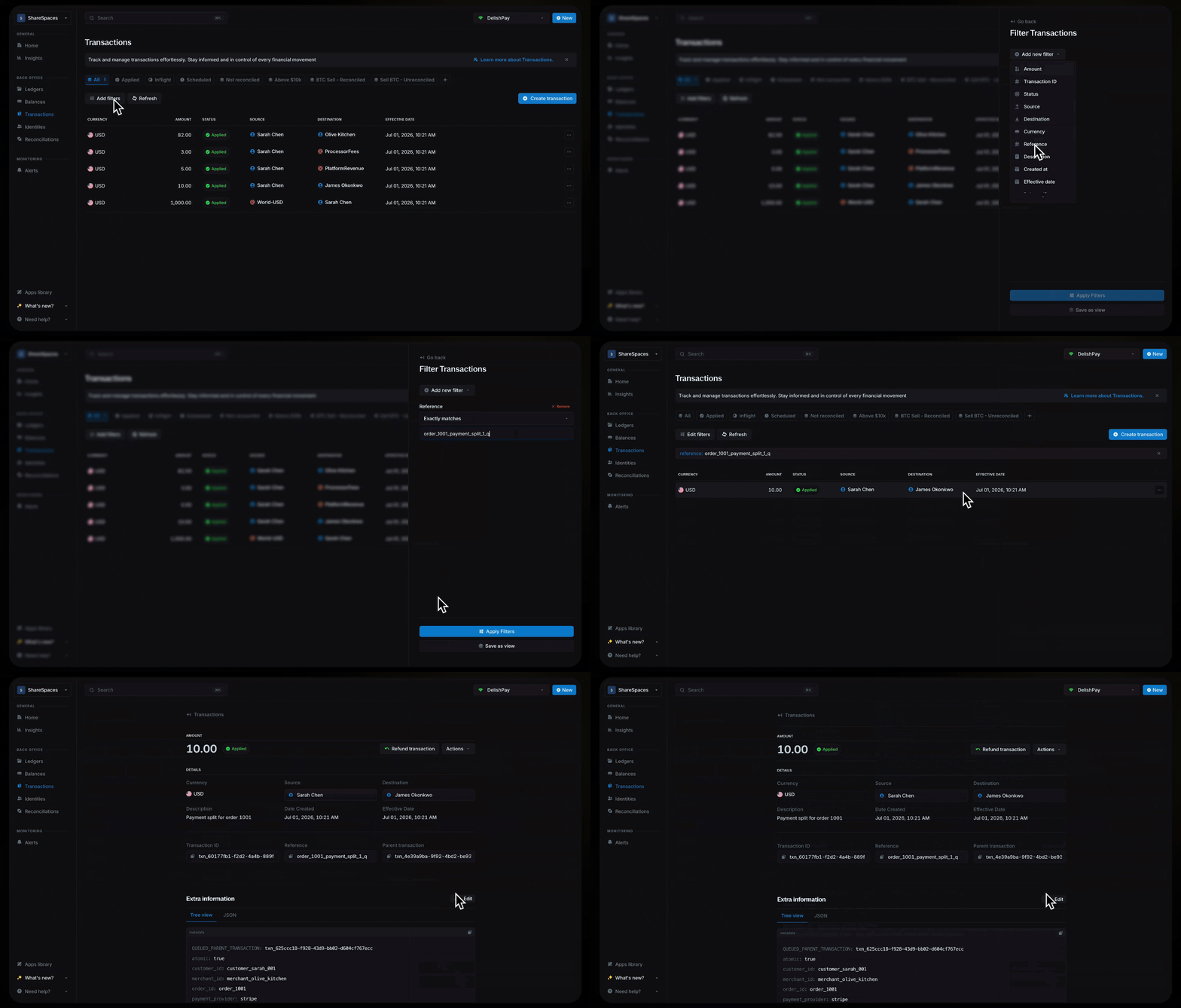
Say Olive Kitchen messages support asking why their payout for order 1001 looks short, or someone on the team needs to confirm James was paid. After creating the split, you may need to see everything that happened for the order. This could be for support, finance, debugging, or reconciliation.
To do this, you can open the Transactions page in Blnk Cloud and filter by the transaction reference to find the related records.
What else can you build?
Once you can split customer payments, you can apply the same pattern to any flow where one customer-facing payment has multiple internal owners. That includes marketplace commissions, delivery settlements, hotel or travel bookings, creator payouts, multi-vendor checkout, loan repayment allocation, tax and fee collection, FX spreads, wallet withdrawal fees, and merchant cash advance repayments.
Wrapping up
Sarah pays once and moves on. But inside the ledger, that one payment becomes four clean, traceable entries: $82 to the merchant, $10 to the rider, $5 to platform revenue, and $3 to processor fees.
With Blnk, you can model that as one split transaction. The customer experience stays simple, while your ledger keeps the full detail behind the scenes.
This same pattern works for any payment that splits across multiple owners. You can start with Blnk Core if you want to build and self-host the ledger yourself. If you want a hosted environment where your team can inspect balances, view transactions, and run reconciliation from a dashboard, you can use Blnk Cloud.
Join the Blnk community on Discord to ask questions and share what you're building.